Current: 314.1.1
Hotfix
- Fixed a possible crash in Apex Legends.
Previous
314.0.25
Changes and New Features
- Improved client and overlay stability and performance.
- Improved game detection for AION 2.
- Improved overlay game graphics detection.
- Improved restoring an unpacked app to its public version from the packages page.
- Updated the Appstore icon in the dock.
- Made security improvements to the client and its updater.
Fixed Bugs
- Fixed an issue where a game that reused the process ID of a short-lived process was not detected until Overwolf restarted.
- Fixed an issue where games installed through the Epic Games Launcher v2 were not detected as installed.
- Fixed an issue where Valorant bought two items per click in the buy menu while the overlay cursor was visible.
- Fixed an issue where an app received no game events for the rest of the session when it registered for the same game at almost the same time as another app.
- Fixed an issue where recordings and replays failed when Windows could not resolve the Videos or Pictures folder.
- Fixed an issue where an app with a pending update was installed and relaunched while Overwolf was shutting down.
- Fixed an issue where uninstalling an app while an update for it was pending left the app reported as installed, and every later install was refused as "already installed" until Overwolf restarted.
- Fixed an issue where bringing an app window to the front could freeze the client when the game window was busy or unresponsive.
311.1.6
Hotfix
- Fixed a possible crash on Vulkan games.
311.1.4
Hotfix
- Made internal improvements to the client.
311.1.1
Hotfix
- Fixed a game crash that occurred when running Minecraft with the Vulkan renderer.
311.0.6
Changes and New Features
- Improved how apps receive game events, so in-game stats and overlays load more reliably right after an app launches.
Fixed Bugs
- Fixed an issue where installed apps were not found when Overwolf ran with Windows Administrator Protection enabled.
- Fixed an issue where a local proxy blocking Overwolf's requests left the client showing outdated data.
- Fixed an issue where setting the Overwolf tray icon to "always show" in the Windows notification area was reset after every client update.
310.1.1
Hotfix
- Fixed an issue with in-game cursor in WARDOGS
310.0.16
Changes and New Features
- Screenshots improvements - Screenshots are now cropped and resized using the GPU, and are supported in more games graphic APIs (DX12, OpenGL and Vulkan).
- Security improvements.
Fixed Bugs
- Fixed an issue where overlay hotkeys did not work in-game in Fortnite.
- Fixed an issue with UAC (User Account Control) prompts on Windows 11 when Administrator Protection is enabled.
Game Updates
- Don't Starve - Fixed overlay support.
- Don't Starve Together - Fixed overlay support.
- Kingdom Come: Deliverance and Kingdom Come: Deliverance II - Fixed game detection.
- Escape the Backrooms - Fixed game detection.
- OldSchool RuneScape - Fixed game detection.
- BeamNG.drive - Fixed game detection and added DirectX 11, 12 and Vulkan overlay support.
- Fortnite - Fixed input bug.
309.0.14
Changes and New Features
- Fixed an issue where the game's cursor-visibility state did not update correctly.
- Fixed an issue where Reddit sharing threw an exception and lost the share URL when Reddit returned a relative post URL instead of an absolute one.
- Improved security.
Game Updates
- Conan Exiles - Fixed the detection of the game and DirectX 12 support added.
- Backrooms: Escape Together - Fixed the detection of the game.
- Teamfight Tactics - Fixed the detection of the game.
- Garry's Mod - Fixed the detection of the game.
305.0.9
Changes and New Features
- Added IME (Input Method Editor) support, allowing the typing of non-Latin scripts inside in-game windows.
- Improved security.
Game Updates
- Arc Raiders - Fixed game detection.
- PAYDAY 3 - Fixed game detection.
304.0.11
Changes and New Features
- Changing the install location of Overwolf through the installer is no longer possible if Overwolf is detected as already installed.
- Overwolf apps can now send notifications through the Windows Notification Center.
Fixed Bugs
- Fixed the overlay injection to Arc Raiders's splash screen.
- Fixed Counter-Strike 2 minimizing when switching from Fullscreen to Fullscreen-Windowed.
Game Updates
- Subnautica 2 - Fixed the detection of the game..
- Arc Raiders - Fixed the detection of the game.
- Off The Grid - Improved the detection of the game.
- Dead By Daylight - Fixed the detection of the game.
- 33 Immortals - Added overlay support for the game's Epic Games version.
- Limbus Company - Added DirectX 12 overlay support.
300.0.11
Changes and New Features
- The overlay can now be opened in games that are running in 'Fullscreen Exclusive' mode (interaction with the overlay with mouse and keyboard is not available), like Battlefield 6 and Counter-Strike 2.
Fixed Bugs
- Fixed an issue where the arrow keys stopped working after an app's hotkey was pressed.
- Fixed an issue where the Overwolf client update failed in some cases.
- Fixed an issue where Overwolf didn't launch after getting updated, due to files getting locked by multiple processes.
- Fixed freezes that occurred in Riot Games.
Game Updates
- Added Vulkan overlay support for Star Citizen.
296.3.2
Fixed Bugs
- Fixed an issue where CEF crashes (rare).
296.0.23
Changes and New Features
- Improved the overlay injection to Roblox.
- Reduced flickering when switching between windows of apps that are open in parallel.
Fixed Bugs
- Fixed the crashing of games that use NVIDIA's Anti-Aliasing DLSS.
- Fixed a game cursor visibility issue that occurred in certain games.
- Fixed the overlay adjusting when a game's window is resized in windowed mode.
- Fixed the adjustment of app windows on desktop when dragged between monitors with different DPI scales.
294.0.18
Changes and New Features
- The Overwolf client now supports its own URL protocol, allowing apps to be downloaded from the web Appstore via deeplinks.
Fixed Bugs
- Fixed an issue where app windows were not always visible when entering the exclusive mode overlay.
- Fixed an issue where Overwolf could not launch after getting updated.
- Fixed an issue with game cursor visibility for games using raw input.
Game Updates
- Rainbow Six: Siege - Fixed several issues with cursor support.
- Fortnite - Improved game cursor detection.
- Lies of P - Updated the game's executable name.
- Terraria - Fixed the cursor issue.
- PUBG - Fixed the cursor issue in the overlay's exclusive mode.
- Arknights: Endfield - Fixed the cursor issue in the overlay's exclusive mode.
292.142.12
Changes and New Features
- Updated the CEF Framework for the Overwolf client to version 142
Game Updates
- Possible fix for ARC Raiders game crash
- Fixed MechWarrior 5: Mercenaries detection issue
- Added DX12 support for Enshrouded
- Fixed Brickrigs executable name
292.0.5
Changes and New Features
- NVIDIA filters will now be ignored when taking screenshots
Fixed Bugs
- Fixed an issue with black textures in some DX11 games
Game Updates
- Improved detection of Roblox and Roblox Microsoft Store Edition
291.0.1
Changes and New Features
- Minor bug fixes and improvements
Game Updates
- Replaced the original Guild Wars instance with Guild Wars Reforged instance
Overlay improvement for VRChat
Fixed Foxhole overlay issue
290.1.2
Changes and New Features
- Improved ads memory management
285.1.13
Changes and New Features
- Improved analytics and server-side performance
Fixed Bugs
- Fixed another case where Overwolf caused mouse lag
Game Updates
- Improved Plants vs Zombies: Garden Warfare 2 overlay
- Fixed Escape From Duckov invisible cursor
- Updated FiveM process detection
- Added DirectX 12 support for Escape The Backrooms
- Fixed Call of Duty: Black Ops 6 process detection
283.1.4
Changes and New Features
- Improved overlay injection into game windows. This will prevent the injection into in small “loading” windows (e.g. Rainbow Six: Siege AntiCheat/Shader compilation window).
- Improved default browser detection logic.
Fixed Bugs
- Fixed an issue that prevented stopping a replay recording when no video frames were received.
- Fixed the recording process's replay buffer stopping when existing a game.
- Fixed a few memory leak issues that occurred when a specific Overwolf file API was used.
- Fixed an issue with the cursor visibility when entering or exiting the overlay exclusive mode (cursor on screen while in-game) without moving the mouse.
- Hotfix - an issue where Overwolf caused mouse lag
Game Updates
- Fixed Path Of Exile and Path of Exile 2's overlay compatibility issues with 3rd party programs.
- Improved HDR compatibility with Overwatch 2
282.0.9
Changes and New Features
- Improved mouse hotkey support
- Improved detection of video recording encoders
- Improved recording engine (OBS) and error reporting upon game exit
Fixed Bugs
- Fixed an issue where certain elements in the settings page moved when switching to high-DPI monitors.
- Fixed an issue where in-game windows would appear half-transparent in certain games, when using dock stations.
- Fixed an issue with Overwolf app windows not maximizing all the way to the taskbar.
- Fixed screenshot capturing not working in Fortnite.
Game Updates
- Fixed invisible cursor issue in Legion TD 2
- Added overlay support for Ready or Not (Epic Games Store)
- Updated the Ready or Not executable name (Steam version) for overlay detection
- Overlay issues fixed for F1 2025, Fortnite and The Finals
- Improved detection of Osu! and Path of Exile 2
- Removed instance for NODE: The Last Favor of the Antarii
- Fixed a cursor issue in the Arena Breakout: Infinite overlay
- Fixed the detection of The Finals (following the game's latest update, which changed the process name)
280.1.4
Changes and New Features
- New Riot Games overlay guideline. More information is available here: https://dev.overwolf.com/ow-native/guides/game-compliance/riot-in-game-ads/
- Mouse hotkeys are now supported: Middle Mouse Button + modifiers, XButton1 (back) and XButton2 (forward).
Fixed Bugs
- Fixed the FPS counter not showing in DirectX 12 games.
- Fixed an issue where enabling/disabling a game's overlay from inside of an app while the Overwolf Settings window was open, caused the toggle in the settings to not get updated and become unclickable.
- Fixed an issue where the Escape key could not be assigned as a passthrough hotkey.
Game Updates
- Added DirectX 12 overlay support for DRAPLINE
- Added DirectX 12 overlay support to PEAK
276.0.6
Changes and New Features
- Overlay compatibility improvements to additional 3rd party programs.
Fixed Bugs
- Fixed a delay in the loading of overlay windows when refocusing on games (specifically DirectX 11/12 rendered).
- Fixed an issue where reShade effects were not seen in video recordings.
- Fixed an issue where the wrong default browser was identified following a recent Windows update.
275.0.12
Changes and New Features
- Improved overlay compatibility with 3rd party programs
- 'Escape' can now be set as a hotkey
- Added DirectX 12 overlay support for Insurgency: Sandstorm
Fixed Bugs
- Fixed screenshot capture in Fortnite
- Fixed Counter-Strike: Source detection
- Fixed crashes in Warhammer 40K: Darktide
273.1.4
Changes and New Features
- Overlay improvements and fixes for games using OpenGL rendering
- Overlay support removed for Albion Online
- Updated overlay support for Once Human
- Updated overlay support for Deadlock
- Overlay support added for modded Celeste
Fixed Bugs
- Fixed a rare case where some ads would play with sound on instead of being muted
- Fixed input issue in PUBG
270.0.11
Changes and New Features
- Improvements to the performance of the overlay.
- Old version files of apps will now be cleaned on Overwolf launch.
Fixed Bugs
- Fixed an issue accessing webpages in the Overwolf browser.
- Fixed the process of app uninstallation, which caused the creation of an 'uninstall.html' file in the 'Downloads' folder.
267.1.1
Hotfix
- Fix for the Overwolf indexedDB quota check; this will prevent indexedDB wipes and data loss in Overwolf applications.
266.1.25
Changes and New Features
- Updated the CEF Framework for the Overwolf client to version 131
- Added DirectX 12 overlay support to SUPERVIVE
- Added DirectX 11 overlay support to Brawlhalla
- Overlay support added for Hell Let Loose - Epic Games Launcher
- Added DirectX 12 overlay support for Overwatch
Fixed Bugs
- Resolved the reset of app settings that occurred after the previous Overwolf update
- Fixed invisible cursor issue in DREDGE
266.1.25
Changes and New Features
- Improvements to the launch process when running Overwolf as administrator
- Improvements to app launch time
- Overlay support added for Path of Exile 2 - Epic Games Launcher
- Overlay support added for Satisfactory - Epic Games Launcher
Fixed Bugs
- Fixed failures of apps to launch after their installation from the Appstore
- Fixed Satisfactory overlay issue
- Fixed crashes related to DirectX 12 rendering in games
- Fixes and improvements to detection of Path of Exile and Path of Exile 2
263.0.11
Changes and New Features
- Audio improvements for Overwolf's recording engine
- Added DirectX 12 overlay support for New World
- Added overlay support to Witchfire (Steam)
Fixed Bugs
- Fixed and improved overlay support for DirectX 12 and OpenGL games
- Fixed Battlefield 1 overlay support
- Fixed Call of Duty game detection
260.0.8
Changes and New Features
- Improved handling of cases where the disk runs out of space during recording
- Added DirectX 12 support to Hunt: Showdown
- Added DirectX 12 support to Once Human
- Improved detection of Rainbow Six: Siege DirectX 11
- Improved detection of SUPERVIVE
- Added DirectX 11 and 12 support for Tibia
Fixed Bugs
- Fixed overlay issues related to running OpenGL games with AMD GPUs
- Fixed issue where encoders were not detected, causing video recording to fail
- Fixed Resident Evil 4 detection
- Fixed Spectre Divide overlay issue
- Fixed PUBG overlay input issue
- Fixed a BeamNG.drive overlay issue
- Fixed a Satisfactory overlay issue
258.1.7
Fixed Bugs
- Fixed spamming of logs when overlay is running with DirectX 12 games.
- Removed an error message that appeared when trying to load an app that is already loaded.
258.0.6
Changes and New Features
- A new limit introduced to Overwolf logs to prevent the same line from being spammed.
- A new mechanism was added that will repair broken apps upon Overwolf's launch.
Fixed Bugs
- Fixed several bugs related to selection of custom video folders in capturing apps.
256.0.2
Changes and New Features
- Added support for Brave browser (for opening links from Overwolf apps)
- Improved the detection of Counter-Strike: Source
- Improved the detection of Dungeons of Aether
- Added support for Dead by Daylight Windows Store
- Added DirectX 12 support for PAYDAY 3
Fixed Bugs
- Fixed an issue where Overwolf didn't not load properly if OverwolfBrowser.exe ran as admin.
- Fixed an issue where the microphone input sound was heard on all audio tracks when its volume was set to 0 at the start of the recording
- Fixed an issue with the detection of audio devices when the output and input volume was set to 0
- Fixed Detection for Metin2
- Fixed Farming Simulator 22 invisible cursor issue
- Fixed Predecessor invisible cursor issue
- Fixed support for modded instances of Stardew Valley
- Fixed issues for Final Fantasy XIV
254.0.13
Changes and New Features
- New audio features and improvements to the Overwolf-OBS recording engine.
- Added DirectX 12 to SCUM
- Added DirectX 12 support to Microsoft Flight Simulator
- Added DirectX 11 support to Star Wars Battlefront II
Fixed Bugs
- Fixed an Overlay issue with Honkai: Star rail.
- Fixed an issue where the folder picker failed to open for a folder a user has
no permission to. - Fixed Sims 4 (new game process)
- Fixed Risk of Rain 2 game detection
251.1.1
Changes and New Features
- AV1 encoders now available for Intel GPUs that support it.
- Added DirectX 12 support to the XDefiant overlay.
Fixed Bugs
- Fixed the issue where the option to exit Overwolf upon app exit caused Overwolf to close, despite other apps still running.
- Fixed keyboard presses passing through the overlay in Genshin Impact.
250.1.1
Changes and New Features
- AV1 encoders have been added to the recording engine. Currently available only for NVIDIA and AMD GPUs that support AV1 encoding.
Fixed Bugs
- Overwolf Updater security fixes.
- Fixed an issue where Overwolf failed to reset supported features in case a game’s overlay was terminated due to a second game launch.
- Fixed an issue where an installed app failed to launch when running its installer.
248.120.19
Changes and New Features
- Updated the CEF Framework for the Overwolf client
Fixed Bugs
- Fixed an issue where re-setting Overwolf's videos folder to default resulted in a permissions error
243.1.1
Changes and New Features
- Improved reporting and analytics in case the overlay fails to successfully connect to a game.
242.1.6
Changes and New Features
- Added DirectX 12 support to the Sea of Thieves overlay
- Added DirectX 12 support to the Palworld overlay
Fixed Bugs
- Fixed an issue where hotkeys passed through the overlay to games
- Fixed the DCS World overlay
- Fixed cursor issues in the Honkai: Star Rail overlay
- Fixed the detection of Stormgate
242.0.12
Fixed Bugs
- Fixed an issue where BMP screenshots in DX12 games were saved as JPEG.
- Removed JPEG conversion when trying to capture in-game screenshots as BMP.
- Fixed a possible bug that caused Overwolf to crash in Valorant
241.0.10
Changes and New Features
- Improved error and crash handling for our OBS recording engine.
Fixed Bugs
- Fixed screenshot capturing in World of Warcraft.
- Fixed the overlay rendering in SCP: Secret Lab.
240.0.6
Changes and New Features
- Added DirectX 12 overlay support to The Witcher 3: Wild Hunt.
Fixed Bugs
- Fixed a bug that prevented the overlay from working properly in Diablo 4, specifically when running with NVIDIA 40 Series GPUs.
- Fixed a possible memory leak in the overlay in Vulkan games.
- Fixed a bug that prevented the opening of app subscription pages from in-game windows.
236.2.2
Changes and New Features
- We have updated our CMP (Consent Management Platform) to support the IAB TCF 2.2 policies.
You can read more about TCF 2.2 in the following link: https://iabeurope.eu/tcf-2-2-launches-all-you-need-to-know/ - Made improvements to CoD: Modern Warfare III and CoD: Modern Warfare II game detection.
Fixed Bugs
- Minor bug fixes.
- Fixed an issue where, in some cases, the Overwolf client did not shut down correctly upon exit.
234.0.8
Fixed Bugs
- Minor bug fixes.
- Fixed the invisible cursor issue in theHunter: Call of the Wild.
233.2.2
Fixed Bugs
- Fixed black screen recording issue in certain games (CS2, Destiny 2, Warzone, etc.).
- Fixed an issue with the overlay and hotkeys in CS2, when running the game in Fullscreen Exclusive mode.
- Fixed an overlay issue in Vulkan-rendered games.
- Fixed detection of games that are installed in C:\Windows directory.
233.1.2
Changes and New Features
- Added support for Traditional Chinese in the Overwolf client.
Fixed Bugs
- Fixed Overwolf not running after an update and restart.
- Fixed a bug where the taskbar context menu showed in default English instead of the selected language.
- Fixed an issue with the overlay in games running in DirectX 12 rendering.
- Fixed an issue in the recording engine, where it kept running even when the recording app crashed.
- Fixed and improved Overwolf’s co-existence with the SteelSeries Moments app.
- Fixed an issue where users with specific NVIDIA graphics cards would experience
crashes when launching Diablo 4
230.0.10
Fixed Bugs
- Updated the recording engine's list of incompatible GPUs (that don't have support for Quick Sync, NVIDIA NVENC or AMD AMF encoders), according to the new OBS version.
- Fixed an issue where recording with the NVIDIA NVENC encoder failed in setups with both NVIDIA and AMD. dedicated GPUs.
228.0.21
Changes and New Features
- Improved detection of Steam and Epic Games titles when scanning the system for installed game.
Fixed Bugs
- Fixed an issue where sharing a video to Twitter would result in failure.
- Fixed an issue where Overwolf's settings window would unexpectedly open while performing other actions within the Overwolf client.
- Fixed possible game crash issue when using in-game hotkeys in Valorant.
226.1.2
Changes and New Features
- We have started preparations for the end of Windows 7 and 8.1 support.
From the next version onwards, Overwolf will support Windows versions 10 and 11 only. - Another goodbye goes to Gfycat - video sharing to Gfycat will no longer be available.
Fixed Bugs
- Fixed an issue where app windows would occasionally freeze when trying to open a new window.
- Drag resizing an in-game window will no longer get stuck when releasing the drag outside the game’s screen.
- Game-specific hotkeys will no longer revert settings changes on the next Overwolf launch.
224.0.25
Changes and New Features
- New features and improvements to the Overwolf-OBS recording engine, including the following:
- The old NVIDIA_NVENC encoder has been removed.
- New and improved HEVC (H.265) encoders added (*Playing videos that were recorded with HEVC on your system may require an external encoder pack):
- NVIDIA_NVENC_HEVC
- INTEL_HEVC
- AMD_AMF_HEVC
- AMD_AMF and Intel Quick Sync encoders got a big performance boost.
- New method to that improves the detection of supported Overwolf games.
Fixed Bugs
- Fixed a bug where opening multiple desktop apps windows at once had sometimes caused flickering.
223.0.33
Changes and New Features
- New version update indication added to:
- The Overwolf taskbar icon
- The taskbar icon's context menu
- The Settings window
Fixed Bugs
- Fixed a potential crash following notifications that originated in desktop windows.
- Fixed a potential crash related to the OverwolfLauncher.exe.
- Fixed an issue where the new "Update available" message would still appear even after the new version got installed.
- Clarified the logic behind opening Ad links from Overwolf windows
Game Overlays
- Fixed a bug that caused the cursor to turn invisible in Mordhau (Epic Games).
221.109.14
Changes and New Features
- Infrastructure update (CEF 109).
Fixed Bugs
- General bug fixes and improvements.
221.0.4
Changes and New Features
- Added an option for app creators to define hotkey combinations per-game (instead of the same set of combinations for all games).
- We’ve added a shiny new screen with a progress bar and feedback button when uninstalling apps.
220.0.1
Fixed Bugs
- Fixed an offset issue in the overlay that occurred when a game’s resolution was different from the screen resolution, and the DPI was set to a value different than 100%.
- Fixed an issue with app windows that wouldn't get closed when trying to close them from the Taskbar Tray.
219.0.3
Changes and New Features
- "Failed to start application" error message will now link to the new Overwolf troubleshooter.
- Added the ability for the overlay to support for Microsoft Store games.
Fixed Bugs
- Fixed an issue where an app icon would get added to the taskbar tray multiple times.
218.0.8
- General stability improvements.
217.0.9
Fixed Bugs
- Fixed an issue on windows 11, where focusing an overlay window in a game could block other windows from being focused.
- Fixed an issue where app windows would not get recorded in videos in DirectX 12 games.
216.0.26
Changes and New Features
- Log folder max size increased from 6MB to 20MB. More logs = more information to help us help users :)
- Improved signature verification in the Overwolf Updater - this should help fix certain issue that might have occurred during a version setup.
Fixed Bugs
- Custom app hotkeys will no longer be active in game if that app isn't running.
- Fixed an issue with the overlay on windows 11, where, in some cases, windows will not be brought to front while a game is in focus.
- Fixed an issue where, in some cases, opening desktop windows of apps while in-game would caused them to appear blank.
- Fixed an issue with writing to the info.ini file when the path contains Unicode characters.
215.0.13
Changes and New Features
- Improved crash reports for better analysis.
Fixed Bugs
- Fixed an issue where in-game windows in Valorant would resize when clicked just once.
- Resolved an issue with maximizing hidden windows and hiding maximized windows.
- Fixed an uncommon crash that occurred when windows were moved between screens.
212.1.5
Fixed Bugs
- Fixed an issue where opening a desktop window while a game is running would have grabbed the game’s focus.
- Fixed an issue where Overwolf would sometimes get closed when uninstalling an app.
208.1.2
Changes and New Features
- Overwolf processes will now be named according to running apps, in the Windows Task Manager, under the 'Details' tab. For example:

- Overwolf overlay and app will now work for games that are installed under the Windows system directory (C:\Windows\).
- Added new video streaming error codes to help app creators to better communicate what went wrong.
- Updated the overlay and the video recording engine.
Fixed Bugs
- Fixes an issue with shared texture for DirectX 9 games that was caused by the latest Windows 11 update.
- Fixed an issue where held hotkeys were canceled by any other hotkey presses.
204.0.1
Changes and New Features
- Overwolf Installer
- The installer has been updated, and is now running on .NET Framework 3.5.
- We have increased the level of detail in crash reports sent by the installer.
- Overwolf now checks itself before it wrecks itself - it will make sure that it is not set to run in compatibility mode.
Fixed Bugs
- Fixed a couple of issues that occurred when trying to drag click-through windows too fast.
- Fixed another dragging issue for certain Overwolf windows.
201.0.23
Changes and New Features
- Screen DPI Refactor - This affects how Overwolf renders windows on displayed with high DPI settings.
- Various improvements to the Overwolf API (read more here).
Fixed Bugs
- Possible fix to Overwolf crashes that occurred on high DPI displays.
- When sharing to Reddit, the “Success” message had a missing image. It has now been found.
- Fixed rare cases where opening Overwolf windows while in-game had caused it to lose focus.
199.0.15
Changes and New Features
- Overwolf will now install C++ Redistributable DLL files if they are missing from the system.
- Improvements to crash analytics.
- Filtered Audio Capture API - This will allow app creators to capture sound from a specific process, rather than capture all output sound (experimental feature).
- Direct Downloads In Installer Error Messages - If Overwolf's installation fails an error message will now provide a direct link to download the Overwolf setup installer.
198.0.11
Changes and New Features
- New Social Share API for app creators, including an improved share flow.
- Improved Overwolf crash analytics.
Fixed Bugs
- Fixed artifacts when playing Fortnite using an AMD GPU and DirectX 12.
195.0.18
Changes and New Features
- Significant improvements to the Overwolf Updater will now provide a more reliable and trouble-free updating process.
- Improved analytics for memory usage to assist us in fixing and improving it.
- Uploading a video larger than 100MB to YouTube through recording apps will now be more resource-efficient (currently not working due to an issue).
194.0.16
Changes and New Features
- Reduced Overwolf's memory (RAM) usage.
Fixed Bugs
- Removed Overwolf CEF logs, that would sometimes cause spamming.
- Fixed an issue caused in setups where monitors are positioned above one another.
191.0.20
Changes and New Features
- A lot of new APIs for app creators, with more to come.
- Updated our game hooking method.
Fixed Bugs
- Fixed an issue that occurred in apps that were trying to access their media folder if their display name was changed.
- Audio will no longer get unsynced when trying to create a composition of 3 video clips or more.
190.0.13
Changes and New Features
- Hovering over an app icon in the 'Overlay & Hotkeys' and 'Capture' settings tabs now shows a tooltip of the app's name.
- App creators can now add links in their replies to reviews.
Fixed Bugs
- A small CSS fix in the installer for apps with long names.
- Fixed a bug where the Task Bar icon would show an App’s shortcut icon instead of the App’s window icon.
- Fixed the 'Settings' and 'Skins' windows that wouldn't open in the TeamSpeak 3 overlay app.
- Fixed some graphical artifacts in a certain Minecraft version and in some modpacks.
- Fixed an issue that occurred when running PUBG on Windows 11 using DirectX 12.
188.0.22
Changes and New Features
- Improvements to our crash system data. This will allow our development team to swiftly identify and solve errors.
Fixed Bugs
- Fixed overlay issue in Among Us (Epic Games Store version).
- Fixed crashes and graphics issues in OSU!.
- Fixed a bug that caused app windows to become invisible after resize.
- Fixed an offset issue that was caused when using multiple monitors with different DPIs.
- Fixed a minor memory leak with OpenGL.
- Fixed a minor issue with the opening of Game Capture's video player.
- Hotfix for an excessive log creation in Minecraft versions 1.17 - 1.18.1.
187.1.13
Changes and New Features
- Installer
- Improvements to the auto-retries feature in cases of installation issues.
- Windows Insider detection - Up until now, the detection only occurred after Overwolf got installed. From now on, the installer will notify if Windows Insider is detect before continuing the installation.
- You can now see your Overwolf username in the settings under the 'Personal Info' tab.
- Clicking a link in the Appstore will now open the URL in your default browser.
Fixed Bugs
- The Appstore no longer freezes when opening it for the first time indirectly (for example, through an app's subscription link).
- Fixed cases where Overwolf would freeze when turning on Replays with a webcam and closing a game.
- Fixed an issue where it was not possible to resize a game's window if Overwolf was running as Admin.
185.0.12
Changes and New Features
- Standalone plugin for our recording engine - this will allow us to release new versions more quickly.
Fixed Bugs
- Improvements for the Overwolf Updater.
- Fixed a bug where the overlay prevented focus in games on Windows 11.
184.0.35
Changes and New Features
- Improved notification for cases where a game (like EVE: Online) conflicts with Overwolf's default overlay hotkey (Ctrl+Tab).
- Correct keys are now sent when typing in German in Overwolf and in apps.
Fixed Bugs
- Non-transparent app windows no longer get enlarged when being dragged.
- Improvements to the overlay to prevent crashes.
- Fixed an issue where overlay clicks went through in Rainbow Six: Siege.
- Fixed language switching on keyboard when using Overwolf apps in-game.
181.0.11
Changes and New Features
- Overwolf's capture engine can now record 120 FPS videos. Enable this option from Overwolf's capture settings.
- Low disk space indication is now available for use by app creators.
- Performance has been improved in cases where fullscreen optimizations are disabled.
- A new installer version with implemented fallback in case anything is blocking the installation.
Fixed Bugs
- Fixed video capturing of Final Fantasy XIV.
- Overlay will no longer be displayed inside windows smaller than 300x300 pixels (such as the Call of Duty: Warzone “Safe Mode” prompt window).
- Game Capture no longer hangs when it fails to record.
Known Issues
- In some cases, setting the capturing to 120 FPS will result in choppy videos. If this happens, please contact us.
180.0.6
Changes and New Features
- Selecting to not start Overwolf on Windows startup (in Overwolf's settings) will now prompt a short explanation on how apps will be affected.
- New version of the Overwolf capture engine.
- Stabilization improvements to the Overwolf Appstore.
Fixed Bugs
- Fixed a memory leaked that happened when uploading large (200MB+) videos to YouTube.
- Fixed an issue that turned E-mail notifications back on when restarting Overwolf.
- Fixed the slider buttons in the settings that were placed off-center.
- Fixed the 'Sort By' dropdown menu in the Appstore that was incorrectly positioned.
- Fixed an issue that caused apps to freeze on Intel Iris Xe GPUs (updating your Xe drivers may be required).
- Fixed an issue that caused the Appstore to go blank when clicking the middle mouse button.
- Fixed the zoom in/out (that stopped working) in the Overwolf Browser app.
Known Issues
- Browser zoom in/out will cause the page to scroll up and down respectively.
178.0.16
Changes and New Features
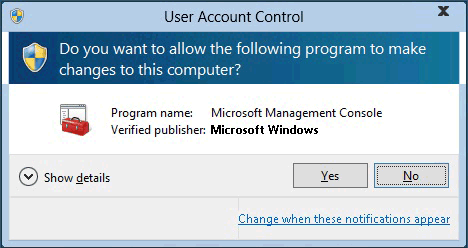
- Overwolf Updater - If the automatic updater fails to run, a system UAC (User Account Control) window will show up to ask for permission to start the updater manually.
- Error messages displayed during installation are now improved and will include more helpful information.
Fixed Bugs
- Apps will now auto-launch once installed to Overwolf from the web Appstore.
- Fixed a bug with increased text scaling in Windows.
- The Overwolf recording process will now be terminated if Overwolf crashed.
Known Issues
- Several problems with the Skins section in the Overwolf Appstore, which will be resolved in the next version.
176.87.25
Fixed Bugs
- Fixed overlay issues in Call of Duty: Warzone (when game is launched as an administrator).
- Fixed issue in Rainbow Six Siege where the overlay hotkeys did not work in-game (for some users).
- When launching a game, the “Allow Overlay” dock notification will be automatically dismissed if it's not being interacted with.
- The Overwolf dock will no longer remain closed when installing an app (if it hasn't been opened yet).
- Fixed video recording for HyperScape.
- Fixed an issue where Overwolf wouldn't start if the local Windows machine.config file was corrupted.
- Fixed an Alt+Tab issue in Call of Duty: Warzone, Destiny 2 & CS:GO when the overlay is 'open' (Ctrl+Tab).
174.87.16
Changes and New Features
- Improvements to the overlay, which is now more reliable and detects game processes better and faster than before.
- Additional improvements to the recording engine, to make it faster and more stable.
- Vulkan API version upgrade - this will allow us to support more Vulkan games.
- Initial re-branding changes, more to come soon!
Fixed Bugs
- Fix an edge case with Rainbow Six Siege that resulted in high CPU usage.
Known Issues
- Reinstalling an app may result in the app's icon disappearing from the dock.
If that happens - worry not! You can open the 'Library' section in the Overwolf Appstore and add it right back :)
173.0.14
Changes and New Features
- Overlay improvements and fixes for DirectX 12 games
- Re-added Call of Duty: Warzone support
- Improvements and better stability to the recording engine
- Added Bitrate control in the Capture settings (under 'Advanced')
Fixed Bugs
- Games list 8963195
- Fixed the overlay for Minecraft version 1.17
- Fixed a CPU usage issue in Rainbow Six Siege
- The Overwolf tray icon will no longer appear blurry when using a high DPI setting
- In-game windows are now positioned correctly when using a high DPI setting
- Overwolf will now correctly start recording the monitor even if a game is minimized
- You can now record Skyrim when it’s in 'Windowed' mode
- The client will now retry to login if it fails to do so on startup
Known Issues
- Overwolf Login screen will not open if the Appstore is closed - this affects the 'Sign In' option in the settings
170.48.15
Changes and New Features
- .NET Framework 4.8 is now implemented in Overwolf.
This marks the end of Overwolf support for Windows 8, in accordance with Microsoft. You may still continue using Overwolf on Windows 8 by installing a legacy (unsupported) version.
Fixed Bugs
- Overwolf no longer reloads apps when a secondary GPU process is being created. This fixes Outplayed's reset when changing tabs.
Known Issues
- The Appstore may jitter slightly when moving between categories.
170.0.13
Changes and New Features
- App creators can now distribute beta version of their apps more easily
- In-App Subscription Flow - Subscriptions can now be purchased and managed within apps*, without having to be redirected to Overwolf's Appstore (*in apps that have implemented this feature)
Fixed Bugs
- Apps that were installed before seeing the dock’s FTUE (First-Time User Experience) are now positioned correctly in the Overwolf dock
- Fixed the black bars/frame that was displayed when playing a video in full screen in video capturing apps
- Fixed the disappearance of the mouse cursor in Hearthstone
169.0.22
Changes and New Features
- Significant improvements to our video capturing engine, including better error indication
- Implemented solution to the coexistence issue with RivaTuner Statistics Server
- First step towards supporting Microsoft Store games. First to come (soon) is Sea of Thieves!
- Improved behavior when switching a video to full screen in any Overwolf apps
- Removed support for Call of Duty: Warzone
Fixed Bugs
- Fixed an issue with the overlay in CS:GO
- Fixed the issue where a nameless Overwolf window would sometimes open when launching a game
168.0.12
Changes and New Features
- Hardware Acceleration can now be disabled through Overwolf's General Settings
- Improvements to the Overwolf installer
Fixed Bugs
- DirectX 11 games should no longer minimize when opening Overwolf windows
- Fixed a bug that would prevent the Overwolf overlay from being displayed (in some cases) for CS:GO
- Uninstalling apps from the library should now work properly
166.1.16
Changes and New Features
- Appstore
- Will now close instantly (without hanging for 30s)
- Faster loading
- Added the option to login with Twitch account
- New look and additional options for the setup installer
- Recording engine update
- Overwolf will restore apps in case the local database got corrupted
Fixed Bugs
- Rainbow Six Siege / Path of Exile - Fixed bug where overlay was not showing properly in Vulkan API and DirectX 11
Known Issues
- The Appstore may jitter slightly when moving between categories